Vajra TTS coordinates multiple Android speech engines for fluent reading
Routes different installed speech engines mid-sentence to read multilingual content with zero-lag language switching, digit grouping, and URL normalization. Vajra TTS, from Tech Assistant for Blind, acts as an orchestrator layered on Android accessibility services. It offers per-app voice profiles, a pronunciation dictionary, and spoken alerts for calls and banking notifications. The app suits blind and visually impaired users plus bilingual readers who need precise, configurable vocal feedback across apps and system notifications.
How does Vajra TTS handle mixed-language text?
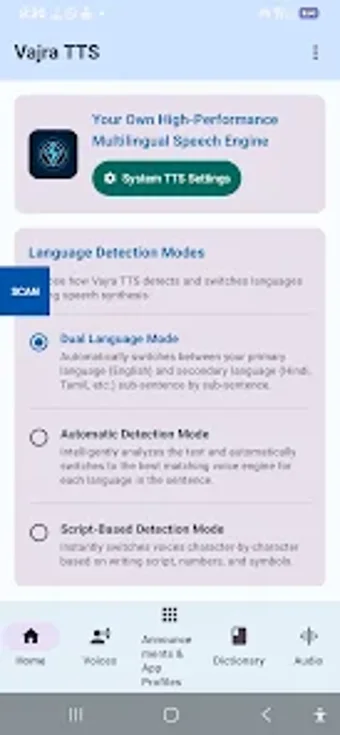
Vajra detects language switches and routes segments to different installed engines, which lets one sentence use multiple voices without audible delay. The app supports an automatic detection mode and a Dual Language Mode that uses script rules or runtime language tags. Users can assign engines for primary and secondary languages, so English segments can use one engine while regional language segments use another.
Does it affect device responsiveness during speech orchestration?
The orchestrator requires at least one underlying TTS engine and operates through Android accessibility hooks, not by heavy background processing. Zero-lag engine switching is emphasised, and the app coordinates existing engines rather than generating audio itself, which keeps CPU and memory impact tied to the chosen speech engines rather than the orchestrator. Real-time routing happens at text-processing time, not as a continuous intensive service.
Is it safe to use with system notifications and sensitive data?
The app integrates announcement features for incoming calls, SMS OTPs, and banking alerts, and it offers configurable verbosity for punctuation and symbol suppression. Smart OTP Formatting reads verification codes digit-by-digit. Because Vajra reads data through accessibility APIs, its operation depends on granted permissions and the security model of the host apps; it does not replace or modify app data.
Does it require technical knowledge to set up and tune?
Basic use requires installing at least one TTS engine and enabling accessibility permissions. Advanced options include custom pronunciation rules, per-app speech profiles, and number-grouping controls, which require some configuration. The developer focuses on assistive workflows common in multilingual regions, so users who follow the built-in settings and community guides can achieve targeted results without developer intervention.
Recommended for users who need precise, multilingual spoken feedback
Vajra is a practical orchestrator for blind and visually impaired Android users who need language-aware, configurable speech across apps and notifications. It depends on existing TTS engines and accessibility permissions, so setup involves selecting compatible voices and granting access. Recommended.